Importing external logs into an Otii 3 project using Python
Overview
When analyzing the energy consumption of connected devices, power data alone is often not enough. To fully understand system behavior, engineers need to correlate protocol events, firmware states, or network signaling with current consumption over time.
This application note demonstrates how to import an external signaling log (CSV-based) into an existing Otii 3 project using the Otii TCP Python API. The imported log appears as a user log aligned with the recorded power measurement, enabling precise time correlation between events and energy usage.
This approach is especially useful in scenarios such as:
- Correlating cellular or wireless signaling events (LTE, NB-IoT, Wi-Fi, BLE) with current spikes
- Aligning firmware debug output with power measurements
- Visualizing state-machine transitions alongside energy consumption
- Post-processing logs generated by modems, network simulators, or protocol analyzers
Products needed
Get started
Log format
The script in this example imports a CSV file with the following structure:
Timestamp,text
0.0,[Starting line - setting up]
22.134,['Random Access Preamble'] ['L2 message'] ['UE --> SS']
22.134,['Random Access Response'] ['L2 message'] ['UE <-- SS']
22.254,['Description_none'] ['RRCConnectionRequest'] ['UE --> SS']
22.254,['Description_none'] ['RRCConnectionSetup'] ['UE <-- SS']
23.172,['ATTACH REQUEST (Combined)'] ['RRCConnectionSetupComplete'] ['UE --> SS']
...- timestamp: Time in seconds, relative to the start of the measurement
- message: Free-form text describing the event
In this example, we have a CSV file named signaling_trace.csv from a network analyzer, Anritsu’s MT8121C, with timestamps in seconds and a text message as above. The timestamps must align with the Otii recording's time base for correct correlation.
How it works
We will use a Python script in this example. We start by creating a basic script named import_log.py (you can find the Python script on GitHub) that connects to a running instance of Otii 3.
At a high level, the script performs the following steps:
- Connects to a running Otii 3 application via the TCP API
- Accesses the currently active project
- Creates a new user log named
MT8121Cin our example below - Retrieves the most recent recording in the project
- Reads the CSV file line by line
- Appends each log entry to the recording at the specified timestamp
The Python script
import csv
from otii_tcp_client import otii_client

LOG_NAME ='MT8121C'
LOG_FILE ='signaling_trace.log'

def import_log(otii: otii_client.Connect) -> None:
    ''' Import text log '''
    project = otii.get_active_project()
    log_id = project.create_user_log(LOG_NAME)
    recording = project.get_last_recording()
    assert recording is not None

    with open(LOG_FILE, newline='', encoding='utf-8') as file:
        reader = csv.DictReader(file)
        for row in reader:
            timestamp =float(row['timestamp'])
            message = row['message']
            recording.append_user_log(log_id, timestamp, message)

def main() -> None:
    '''Connect to the Otii 3 application and run the import'''
    client = otii_client.OtiiClient()

    with client.connect() as otii:
        import_log(otii)

if __name__ == '__main__':
    main()
Automatic license login (Optional)
If you want the script to automatically log in and reserve a license, create a file named credentials.json in the same directory:
{
    "username":"YOUR_USERNAME",
    "password":"YOUR_PASSWORD"
}
This is useful when running the script in CI pipelines, remote environments, or shared lab setups.
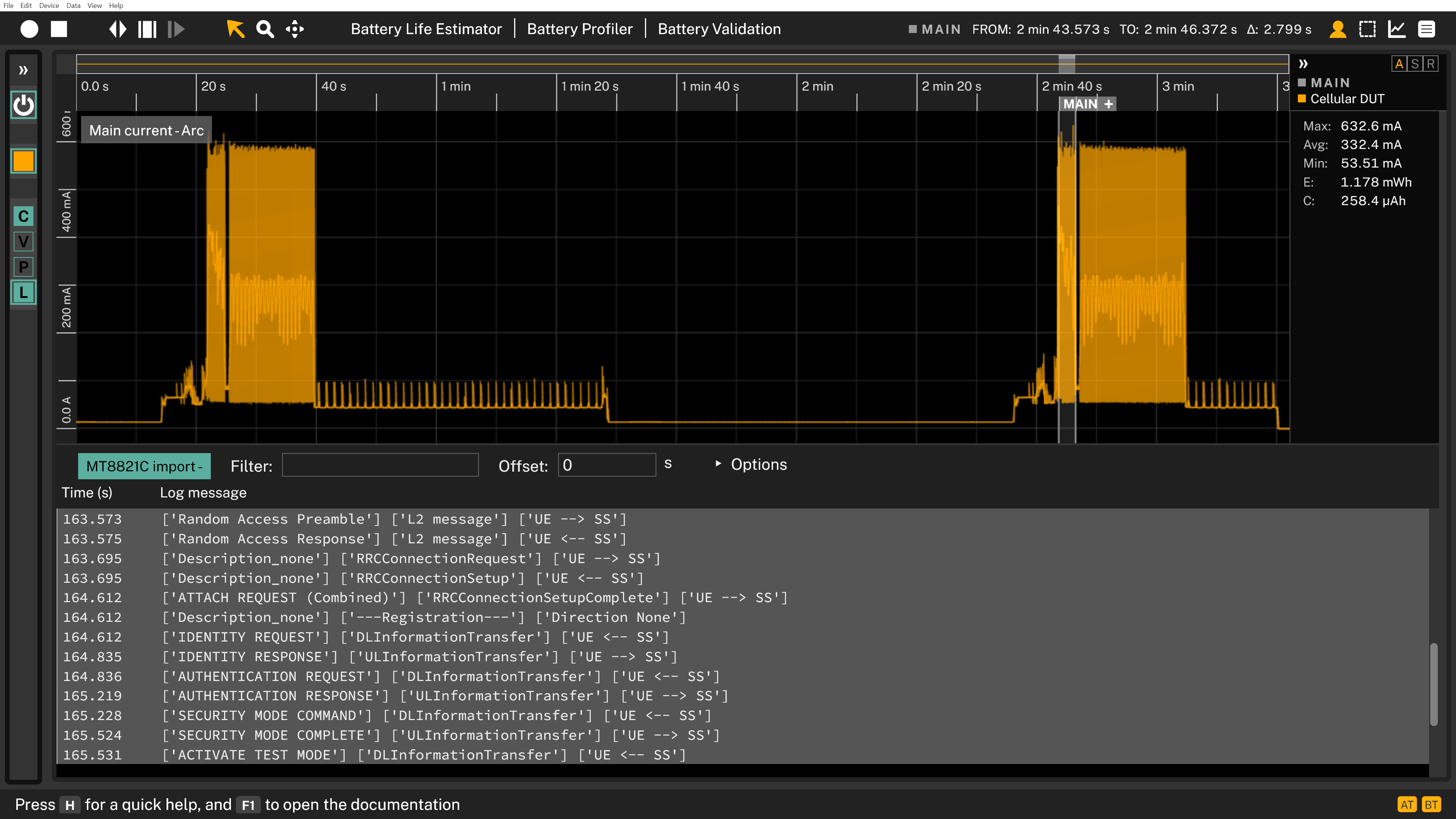
The result in the Otii App
Start Otii 3, open an existing project, and then run import_log.py.The external log will be added to the project as a new measurement.
After running the script:
- A new user log track named MT8121C in appears in the project
- Each imported event is displayed at its corresponding timestamp
- Power consumption can be visually correlated with protocol or system events